
How I Schedule 35 Substack Notes In Two Hours (And Let The Week Run Itself)
The five-node Make automation that runs my Substack Notes on autopilot

Welcome to the Content Hub OS Newsletter: for operators who are done making content harder than it has to be — one system, build, or real-world result every week that you can adapt and run in your own business. If someone forwarded this to you, subscribe here.
Five nodes. One form. A full week of Notes queued before Monday morning.
I joined Substack in October but didn’t start taking it seriously as a platform until March 2026. Once I committed, I committed hard — five Notes a day, almost every day. That consistency is what drives reach. The algorithm rewards people who show up constantly, and Notes are how you show up between longer pieces. Going from zero to nearly 1,000 subscribers in under 30 days, this is a real part of what moved that number.
But five a day manually is a grind. Open Substack, find Notes, type, publish, repeat. Five times. Every day. Across multiple publications if you’re running more than one. The interface isn’t built for volume and it pulls you out of your workflow every single time.
So I built a scheduling automation using Make (grab a free account here if you’re not already on it). The whole thing runs on five nodes. It took an afternoon to build, and I want to give you everything you need to build your own version — including the parts that tripped me up so they don’t trip you up.
My Actual Routine
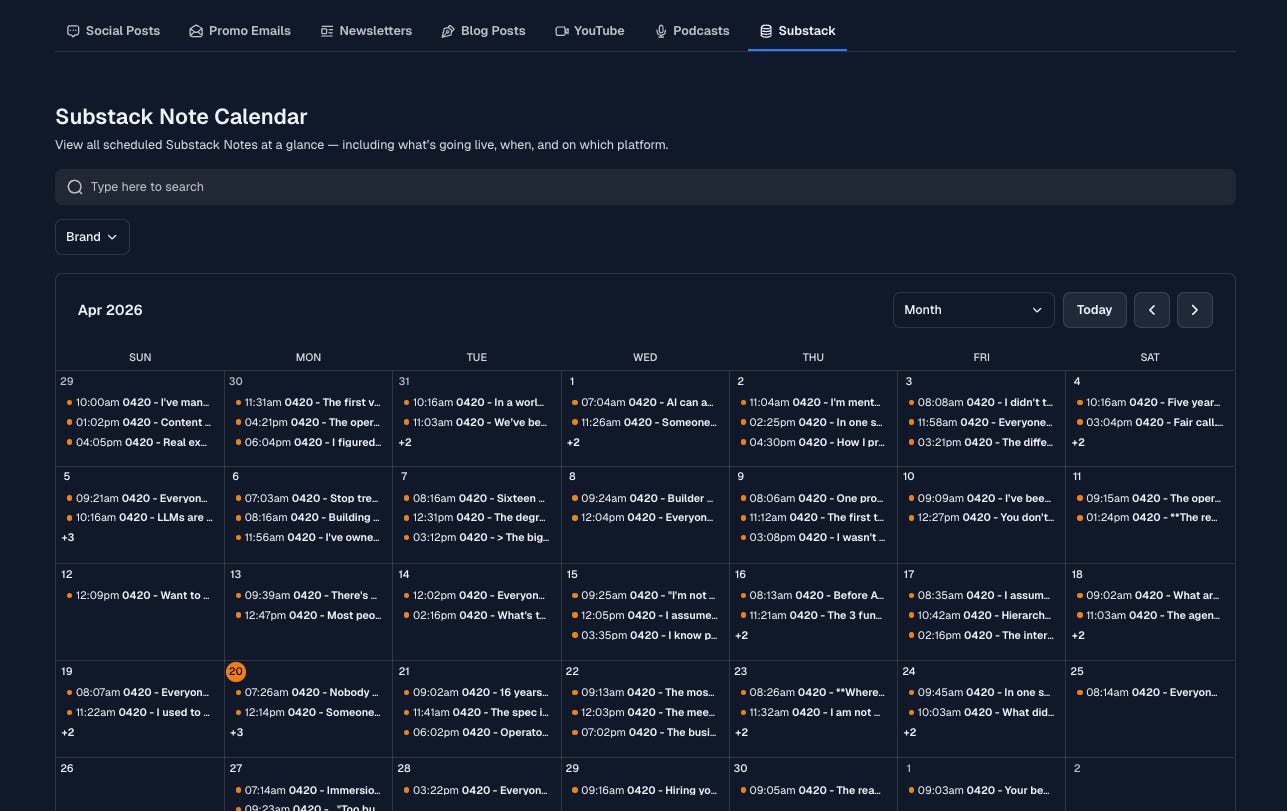
Once a week I sit down and write 35 Notes at once. That’s a full week of five per day.
It takes about two hours.
I write them all inside my content hub, schedule them across the week at different times, and walk away. The automation handles everything from there — no manual publishing, no context switching, no remembering to post.
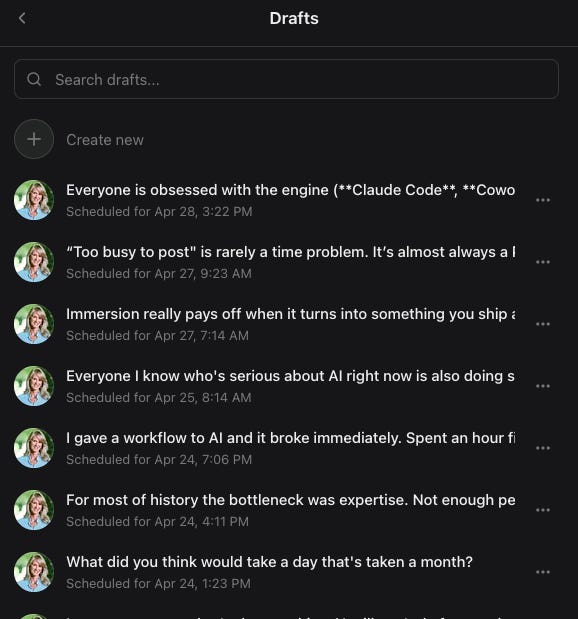
The result looks like this in your Substack drafts queue: Notes stacked up and scheduled, each one sitting there waiting for its time slot. A full week visible at a glance before it even starts.
How The Automation Works
The setup has two parts: a form and a five-node Make scenario.
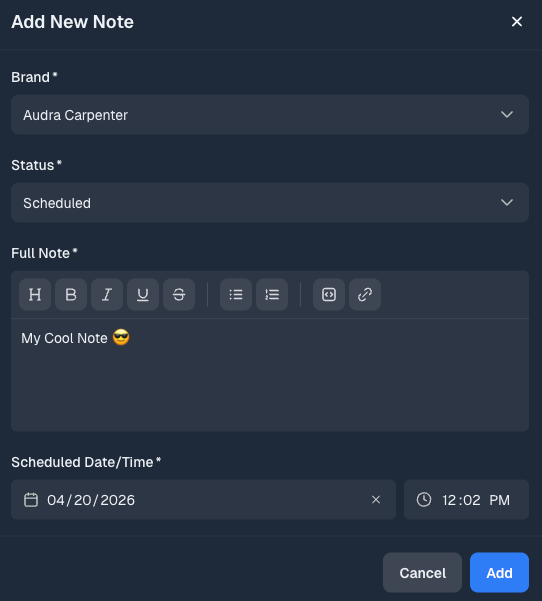
The form captures four fields:
Brand (which publication this Note belongs to)
The Note content
Scheduled date and time
Status
Fill it out, hit submit, and your end of the job is done.
The Make scenario:
Custom Webhook — triggers when the form is submitted
Webhook Response — acknowledges the trigger
Your database: API Call — pulls the record data (Note content, scheduled time, brand)
HTTP POST — sends the Note to Substack’s API with the scheduled publish time
Your database: API Call — updates the record status to confirm it was sent
About 30 seconds from form submission to the Note appearing in your Substack drafts queue.
The Substack API Details
Substack doesn’t publish an official API. This is where I spent a couple of hours — digging through browser network requests to find the right endpoint. Here’s what I found so you don’t have to go looking.
Endpoint: https://[yourpublication].substack.com/api/v1/comment/draft
Method: POST
How To Get Your Substack Authentication
The API uses cookie-based authentication via your substack.sid value. Here’s exactly where to find it in Chrome:
Log in to Substack in Chrome
Right-click anywhere on the page and select Inspect
Go to the Application tab
In the left sidebar, expand Cookies and click on the Substack domain
Find the row named
substack.sidand copy the value in the Value column
Keep this value private. It authenticates as you.
How To Configure The HTTP Module In Make
Here’s every field you need to fill in:
Authentication type: No authentication (auth is handled through the cookie header below)
URL: https://[yourpublication].substack.com/api/v1/comment/draft
Method: POST
Header 1
Name:
CookieValue:
substack.sid=[paste your sid value here]
Header 2
Name:
Content-TypeValue:
application/json
Body content type: application/json
Body input method: Data structure
Body content: Body JSON
Type:
docAttrs - Schema version:
v1Content type:
paragraphText: [map your Note field from your database here]
Trigger at: [map your scheduled datetime field from your database here]
Reply minimum role: everyone
One thing to check: Make handles the trigger_at timezone based on your account settings. Verify your Make timezone matches your local timezone before you schedule anything, or your Notes will go out at the wrong hour.
Parse response: Yes
You Don’t Need My Setup To Build This
My version runs through Content Hub OS, but the automation logic works with whatever database you’re already using.
Airtable, Notion, a Google Sheet — any of them can trigger a Make webhook when a new record is added. The five nodes stay the same. The HTTP call to Substack stays the same. The only thing that changes is what fires the webhook at the start and what gets updated at the end.
If you’re already using Make for anything, you’re most of the way there.
What This Actually Changes
The automation doesn’t write the Notes. You still do that work — and honestly, right now I prefer it that way. Finding your voice first, is more important. That said, this is Make. You could wire an AI call into the scenario and have it generate Notes from a topic or a pillar piece automatically. That’s a build for another day, but the infrastructure is already there if you want to go that direction.
What it removes is the daily logistics tax — the context switching, the manual scheduling, the friction of a separate interface that pulls you out of your workflow every single time.
Two hours a week. Thirty-five Notes written and scheduled. The week runs itself.
The bigger thing this solves
Content consistency breaks people not because they run out of ideas but because the operational weight of showing up every day eventually wins. The writing, the scheduling, the platform-switching, the remembering — it accumulates until publishing feels like a chore and the gaps between posts get longer.
This automation is simple. Five nodes, one API call, an afternoon to build. But what it actually does is put content back in your control. You think once, batch once, and the system handles the rest. The mental capacity you recover doesn’t just save time — it goes back into the work that actually matters. Better Notes. Bigger ideas. The writing you were too depleted to do when you were managing logistics manually.
That’s what a good system does. It doesn’t just make things faster. It makes the work sustainable.
Build This First
Not every automation needs to be complex. This one is five nodes and one API call. The only genuinely hard parts were finding the endpoint and figuring out the authentication — and I just handed both of those to you.
If you’re on Substack and you’re still publishing Notes manually, this is the build to start with. It’s fast, it’s replicable, and the time it returns compounds every single week.
The output is only as good as the system behind it.
— Audra
So when are you building yours? Drop a comment and let me know — I'd love to see what you put together.
If you want to follow the full Content Hub OS build as it happens, the Lab Notes series at audracarpenter.substack.com documents each workflow in detail.
Love it! I gotta do something similar.